Visual Studio 2010 and .NET 4.0.
I am going to download the CTP version today, will post on the new features.
Download the CTP version from below link:
http://www.microsoft.com/visualstudio/en-us/products/2010/default.mspx
http://www.microsoft.com/downloads/details.aspx?FamilyId=922B4655-93D0-4476-BDA4-94CF5F8D4814&displaylang=en
Saturday, May 9, 2009


Tuesday, May 5, 2009
Multiple file upload
My last blog
http://technicalsol.blogspot.com/2009/05/gmail-file-upload-and-remove.html
just talked about adding and removing file upload controls in html.
Here is the code to upload multiple files to server along with the adding file upload control using javascript.
Copy and paste the below lines in aspx page between form tags:
<input type="file" name="attachment" runat="server" id="attachment" onchange="document.getElementById('moreUploadsLink').style.display =
'block';" />
<div id="moreUploadsLink" style="display:none;">
<a href="javascript:addElement();">Attach another File</a>
</div>
<input type="hidden" value="0" id="theValue" />
<div id="myDiv"> </div>
<asp:Button ID="Button1" runat="server" Text="Upload" onclick="Button1_Click" />
Copy and paste the below javascript:
<script type="text/javascript">
function addElement()
{
var ni = document.getElementById('myDiv');
var numi = document.getElementById('theValue');
var num = (document.getElementById('theValue').value -1)+ 2;
numi.value = num;
var newdiv = document.createElement('div');
var divIdName = 'my'+num+'Div';
newdiv.setAttribute('id',divIdName);
newdiv.innerHTML = '<input type="file" name="attachment" id="attachment"/><input type="Button" value="Remove" onclick="removeElement(' + divIdName
+ ')"/>';
ni.appendChild(newdiv);
}
function removeElement(divNum)
{
var d = document.getElementById('myDiv');
d.removeChild(divNum);
}
</script>
Copy and paste the below code in the code behind:
protected void Button1_Click(object sender, EventArgs e)
{
HttpFileCollection uploadFiles = HttpContext.Current.Request.Files;
for (int i = 0; i < uploadFiles.Count; i++)
{
HttpPostedFile uploadFile = uploadFiles[i];
uploadFile.SaveAs(@"c:\inetpub\wwwroot\" + Path.GetFileName(uploadFile.FileName));
}
}
http://technicalsol.blogspot.com/2009/05/gmail-file-upload-and-remove.html
just talked about adding and removing file upload controls in html.
Here is the code to upload multiple files to server along with the adding file upload control using javascript.
Copy and paste the below lines in aspx page between form tags:
<input type="file" name="attachment" runat="server" id="attachment" onchange="document.getElementById('moreUploadsLink').style.display =
'block';" />
<div id="moreUploadsLink" style="display:none;">
<a href="javascript:addElement();">Attach another File</a>
</div>
<input type="hidden" value="0" id="theValue" />
<div id="myDiv"> </div>
<asp:Button ID="Button1" runat="server" Text="Upload" onclick="Button1_Click" />
Copy and paste the below javascript:
<script type="text/javascript">
function addElement()
{
var ni = document.getElementById('myDiv');
var numi = document.getElementById('theValue');
var num = (document.getElementById('theValue').value -1)+ 2;
numi.value = num;
var newdiv = document.createElement('div');
var divIdName = 'my'+num+'Div';
newdiv.setAttribute('id',divIdName);
newdiv.innerHTML = '<input type="file" name="attachment" id="attachment"/><input type="Button" value="Remove" onclick="removeElement(' + divIdName
+ ')"/>';
ni.appendChild(newdiv);
}
function removeElement(divNum)
{
var d = document.getElementById('myDiv');
d.removeChild(divNum);
}
</script>
Copy and paste the below code in the code behind:
protected void Button1_Click(object sender, EventArgs e)
{
HttpFileCollection uploadFiles = HttpContext.Current.Request.Files;
for (int i = 0; i < uploadFiles.Count; i++)
{
HttpPostedFile uploadFile = uploadFiles[i];
uploadFile.SaveAs(@"c:\inetpub\wwwroot\" + Path.GetFileName(uploadFile.FileName));
}
}
Saturday, May 2, 2009
SQL Time Difference
How to get time difference in SQL, if the Date is same?
Here is the way, we can achieve,
DECLARE @date as datetime
DECLARE @date1 as datetime
SET @date = '2009-05-02 22:58:39.037'
SET @date1 = '2009-05-02 23:59:56.087'
The below query will give difference in mili second as i have used ms
SELECT ROUND(cast((datediff(ms, @date, @date1) / 60.0) as FLOAT),2) AS DiffMiliSecond
The below query will give difference in second as i have used ss
SELECT ROUND(cast((datediff(ss, @date, @date1) / 60.0) as FLOAT),2) AS DiffSecond
The below query will give difference in minute as i have used mi SELECT ROUND(cast((datediff(mi, @date, @date1) / 60.0) as FLOAT),2) AS DiffMinute
Here is the way, we can achieve,
DECLARE @date as datetime
DECLARE @date1 as datetime
SET @date = '2009-05-02 22:58:39.037'
SET @date1 = '2009-05-02 23:59:56.087'
The below query will give difference in mili second as i have used ms
SELECT ROUND(cast((datediff(ms, @date, @date1) / 60.0) as FLOAT),2) AS DiffMiliSecond
The below query will give difference in second as i have used ss
SELECT ROUND(cast((datediff(ss, @date, @date1) / 60.0) as FLOAT),2) AS DiffSecond
The below query will give difference in minute as i have used mi SELECT ROUND(cast((datediff(mi, @date, @date1) / 60.0) as FLOAT),2) AS DiffMinute
Gmail Like File upload and Remove
Adding and removing File upload like Gmail
Here is the HTML:
<html>
<input type="file" name="attachment" id="attachment" onchange="document.getElementById('moreUploadsLink').style.display =
'block';" />
<div id="moreUploadsLink" style="display:none;">
<a href="javascript:addElement();">Attach another File</a>
</div>
<input type="hidden" value="0" id="theValue" />
<div id="myDiv"> </div>
</html>
Here is the Javascript:
<script language='Javascript'>
function addElement()
{
var ni = document.getElementById('myDiv');
var numi = document.getElementById('theValue');
var num = (document.getElementById('theValue').value -1)+ 2;
numi.value = num;
var newdiv = document.createElement('div');
var divIdName = 'my'+num+'Div';
newdiv.setAttribute('id',divIdName);
newdiv.innerHTML = '<input type="file" name="attachment" id="attachment"/><a href="#" onclick="removeElement(' + divIdName
+ ')">Remove </a>';
ni.appendChild(newdiv);
}
function removeElement(divNum)
{
var d = document.getElementById('myDiv');
d.removeChild(divNum);
}
</script>
Gmail most probably ajax to achieve this, i have done with javascript.
Here is the HTML:
<html>
<input type="file" name="attachment" id="attachment" onchange="document.getElementById('moreUploadsLink').style.display =
'block';" />
<div id="moreUploadsLink" style="display:none;">
<a href="javascript:addElement();">Attach another File</a>
</div>
<input type="hidden" value="0" id="theValue" />
<div id="myDiv"> </div>
</html>
Here is the Javascript:
<script language='Javascript'>
function addElement()
{
var ni = document.getElementById('myDiv');
var numi = document.getElementById('theValue');
var num = (document.getElementById('theValue').value -1)+ 2;
numi.value = num;
var newdiv = document.createElement('div');
var divIdName = 'my'+num+'Div';
newdiv.setAttribute('id',divIdName);
newdiv.innerHTML = '<input type="file" name="attachment" id="attachment"/><a href="#" onclick="removeElement(' + divIdName
+ ')">Remove </a>';
ni.appendChild(newdiv);
}
function removeElement(divNum)
{
var d = document.getElementById('myDiv');
d.removeChild(divNum);
}
</script>
Gmail most probably ajax to achieve this, i have done with javascript.
Sunday, April 19, 2009
Convert dd/mm/yyyy to mm/dd/yyyy
Copy and paste the below code in the method where we need to change dd/mm/yyyy to mm/dd/yyyy
IFormatProvider provider = new System.Globalization.CultureInfo("en-CA", true);
string datetime = "24/04/2009";
DateTime dt = DateTime.Parse(datetime, provider, System.Globalization.DateTimeStyles.NoCurrentDateDefault);
Happy Coding :)
IFormatProvider provider = new System.Globalization.CultureInfo("en-CA", true);
string datetime = "24/04/2009";
DateTime dt = DateTime.Parse(datetime, provider, System.Globalization.DateTimeStyles.NoCurrentDateDefault);
Happy Coding :)
Saturday, April 18, 2009
Switching between http to https
Sometimes we need to make few pages to run in https and few run in http, I thought to find someway where we can change the browsing of page from http to https or https to http. There is very simple way to do it.
Let's start.
1. Create a module with name Secure.cs file under App_code folder and paste the below code
using System;
using System.Linq;
using System.Web;
using System.Xml.Linq;
///
/// Summary description for Secure
///
public class Secure :IHttpModule
{
public Secure()
{
}
public void Dispose()
{
}
public void Init(HttpApplication application)
{
application.BeginRequest += (new EventHandler(this.Application_BeginRequest));
}
private void Application_BeginRequest(Object source, EventArgs e)
{
HttpApplication httpApp;
HttpContext httpContext;
try
{
httpApp = (HttpApplication)source;
httpContext = httpApp.Context;
string str = httpContext.Request.RawUrl;
XDocument xmlDoc = XDocument.Load(httpContext.Server.MapPath("Secure.xml"));
var q = from c in xmlDoc.Descendants("Page")
where c.Attribute("URL").Value.Trim().ToLower().Equals(str.Trim().ToLower())
select (string)c.Element("Secure");
foreach (string name in q)
{
if (Convert.ToBoolean(name))
{
httpContext.Response.Redirect(httpContext.Request.Url.ToString().Replace("http", "https"));
}
else
{
httpContext.Response.Redirect(httpContext.Request.Url.ToString().Replace("https", "http"));
}
}
}
catch (Exception ex)
{
}
}
}
2. In web.config, add below lines
<httpModules/>
<add name="MyHttpModule" type="Secure"/>
</httpModules />
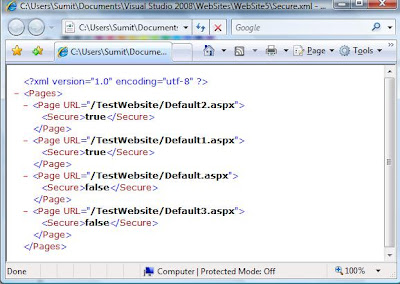
3. Create a XML with name secure.xml like below image, In the below xml replace your URL attribute of page element with your url(directory + page name) and in secure element specify true means, you want it to be accessed as https and if it is false , it means you want to access it as http
Happy Coding :)
Let's start.
1. Create a module with name Secure.cs file under App_code folder and paste the below code
using System;
using System.Linq;
using System.Web;
using System.Xml.Linq;
///
/// Summary description for Secure
public class Secure :IHttpModule
{
public Secure()
{
}
public void Dispose()
{
}
public void Init(HttpApplication application)
{
application.BeginRequest += (new EventHandler(this.Application_BeginRequest));
}
private void Application_BeginRequest(Object source, EventArgs e)
{
HttpApplication httpApp;
HttpContext httpContext;
try
{
httpApp = (HttpApplication)source;
httpContext = httpApp.Context;
string str = httpContext.Request.RawUrl;
XDocument xmlDoc = XDocument.Load(httpContext.Server.MapPath("Secure.xml"));
var q = from c in xmlDoc.Descendants("Page")
where c.Attribute("URL").Value.Trim().ToLower().Equals(str.Trim().ToLower())
select (string)c.Element("Secure");
foreach (string name in q)
{
if (Convert.ToBoolean(name))
{
httpContext.Response.Redirect(httpContext.Request.Url.ToString().Replace("http", "https"));
}
else
{
httpContext.Response.Redirect(httpContext.Request.Url.ToString().Replace("https", "http"));
}
}
}
catch (Exception ex)
{
}
}
}
2. In web.config, add below lines
<httpModules/>
3. Create a XML with name secure.xml like below image, In the below xml replace your URL attribute of page element with your url(directory + page name) and in secure element specify true means, you want it to be accessed as https and if it is false , it means you want to access it as http

Happy Coding :)
Monday, April 6, 2009
ASP.NET Static variable
Let's examine behavior of static keyword in ASP.NET
Create a class TestStatic with static member.
public class TestStatic
{
private static string strTest = string.Empty;
public static string Test
{
get
{
return strTest;
}
set
{
strTest = value;
}
}
}
Create a aspx page and place two buttons on it. On click of Button1 event assign value to Test along with with DateTime.
protected void Button1_Click(object sender, EventArgs e)
{
TestStatic.Test = "Logged in successfully" + DateTime.Now.ToLongTimeString();
}
and on click of button2 event write the value of Test on the page
protected void Button2_Click(object sender, EventArgs e)
{
Response.Write(TestStatic.Test);
}
Run the application and click Button1, now value has been assigned into TestStatic. Test will contain "Logged in successfully" along with date time stamp.
Now click on Button2, the value assigned into TestStatic.Test will be displayed on the page with time stamp.
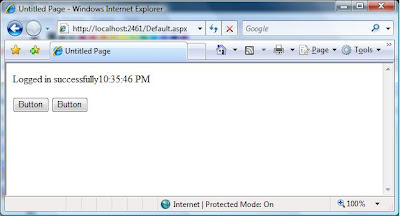
Now open another browser instance(using start menu or shortcut in taskbar or shortcut in desktop). Copy URL of above test application and paste on the address bar of the browser and hit enter. Obviously you will get both the buttons (Button1 & Button2).
I have used FireFox.
Don't click on Button1, Click on Button2. You will get the value of TestStatic.Test.
The value of TestStatic.Test displayed on the page will be the value which has been assigned using last browser.
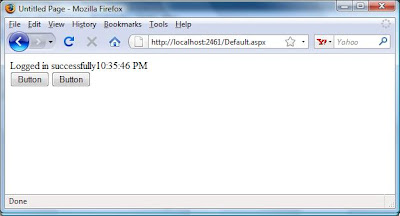
This behavior is obvious because ASP.NET is multi threaded application, so the value of static member shared between threads.
Bottomline is, be carefull while using static variable in ASP.NET as it might put your application in weired situation. Use static variable only when you are sure static variable will be accessed in thread safe manner.
Happy Coding :)
Create a class TestStatic with static member.
public class TestStatic
{
private static string strTest = string.Empty;
public static string Test
{
get
{
return strTest;
}
set
{
strTest = value;
}
}
}
Create a aspx page and place two buttons on it. On click of Button1 event assign value to Test along with with DateTime.
protected void Button1_Click(object sender, EventArgs e)
{
TestStatic.Test = "Logged in successfully" + DateTime.Now.ToLongTimeString();
}
and on click of button2 event write the value of Test on the page
protected void Button2_Click(object sender, EventArgs e)
{
Response.Write(TestStatic.Test);
}
Run the application and click Button1, now value has been assigned into TestStatic. Test will contain "Logged in successfully" along with date time stamp.
Now click on Button2, the value assigned into TestStatic.Test will be displayed on the page with time stamp.

Now open another browser instance(using start menu or shortcut in taskbar or shortcut in desktop). Copy URL of above test application and paste on the address bar of the browser and hit enter. Obviously you will get both the buttons (Button1 & Button2).
I have used FireFox.
Don't click on Button1, Click on Button2. You will get the value of TestStatic.Test.
The value of TestStatic.Test displayed on the page will be the value which has been assigned using last browser.

This behavior is obvious because ASP.NET is multi threaded application, so the value of static member shared between threads.
Bottomline is, be carefull while using static variable in ASP.NET as it might put your application in weired situation. Use static variable only when you are sure static variable will be accessed in thread safe manner.
Happy Coding :)
Subscribe to:
Posts (Atom)
Site Meter

